
Every English teacher wants to talk about ChatGPT right now. When I thought about how I wanted to tackle this at Moving Writers, this first person who came to mind is today’s guest writer, my colleague, Philip Tickle. Philip wows and amuses me every day with his ability to use ChatGPT to make his teaching life easier. I knew you had to hear from him. If you’re looking for other ways to use ChatGPT, I shared about that (for free!) In the Moving Writers Community in September.
I recently had to send an email to students who were accepted (or not) into our SCA. So, I decided to use the “AI” in email for more than just spelling…
Enter ChatGPT, one of my favorite tech tools! I asked ChatGPT to:

The resulting email was pretty good. After some tweaks and updates, I sent it.
At the first meeting, a student said: “Mr. T, we ran your letter through a website that determines the likelihood that something was written by AI and it said that there was a 94% chance that it was AI-generated.
My response: “Well, what if 94% of it was written by AI.”
We’re BUSY People!
Teachers are busy people. We have shorter times for at-work productivity than many other careers. Why not use technology to shorten the time it takes to complete some of the more menial tasks (and maybe even begin or further some of the other more complicated tasks)?
Well, before I go further, let me state that I am a firm believer in the “sign up and try it out” method. That’s how I started with ChatGPT after all. But, let me demonstrate some of these possibilities.
Being MORE Productive
So, in the interest of fairness to myself (this is a 1,000 word blog post after all…), I asked ChatGPT:

Its list was fairly comprehensive (though not exhaustive or perfect).
The results:
- Lesson Planning
- Research Assistance
- Content Creation*
- Answering Questions
- Grading Assistance
- Language Translation
- Generating Examples*
- Classroom Management Tips
- Professional Development
- Scheduling and Time Management
- Data Analysis
- Writing Assistance
- Customized Educational Content*
- Tutoring and Homework Help
For the sake of brevity (*and as some of these topics overlap), I will focus on Grading Assistance, Content Creation, and Writing Assistance.
- Grading Assistance
While you could provide ChatGPT with the criteria to evaluate student work and
then copy-paste the student work to be analyzed, I’m not sure that chat AI is developed enough to fully grade student work. BUT… don’t let that scare you away!

It isn’t perfect, but it saved me a lot of time! Starting with this as a framework puts me much further along in my productivity.
Extensions:
- Translate the rubric into another language (#6)
- Provide the learning objectives and generate an assignment (#3) and rubric for the assignment (#5)
- Content Creation (including Generating Examples and Customized Educational Content)
Yes, ChatGPT will write an entire lesson plan for you… Just copy and paste the
standards/objectives and it will create a full lesson plan (although, they can be a bit simplistic).
BUT, wait… before we excuse this potential application, consider this:
You could ask it to design a game, write a script, or create discussion questions all about a certain topic.
For example, let’s create a short introduction to the noble gasses in the style of Hogwarts Potions Master Severus Snape…

The resulting text is certainly a more fun way to introduce this material than just reading from some website. (Even better, deep fakes can simulate the voice and read it…)

Continuing the fun, let’s add another task.

Before you could even sip your chilled coffee from your planning period hours
ago, here is an entire handout for students to use in reviewing the standards. It’s that easy…
Going even further, AI can then generate questions for a formative assessment.

Wow… Before you’ve even read the standards and thought of a question, here’s
a short quiz that would be an easy exit ticket or other quick assessment,
including an answer key.
Extension:
- Provide an explanation for the correct answers on the quiz (#4 and #14)
That’s not necessarily an entire lesson plan, but that is a significant portion of the
material for a lesson plan!
But, what if you just need examples fresh examples for content, yet your brain is
struggling to generate it (like for verb tense)?

Now, the resulting text isn’t perfect… This is an example of when human
filtering may be necessary:
Present: The sun rises in the east every morning.
Past: The sun rose in the east every morning.
The example from the past tense is technically correct, but does seem a bit post-apocalyptic…
Extension:
- Share a link with ChatGPT and have it summarize or create a handout or write quiz questions (works for articles and videos)
- Writing Assistance
Okay… here I am on a writing blog talking about using the computer to help me
write…
(Preparing to be canceled…)
But, hear me out… THIS IS A BIG ONE!
I often use this to filter/improve my own writing. Maybe I am writing an email and I am a bit heated. I can input the email and ask ChatGPT to help me make it sound more professional. Or, if you are incredibly verbose, you can ask it to help with brevity. While you’re at it, maybe you have it check your writing for grammar and punctuation.
But honestly, you have a student causing issues in class and you need to send the parent an email…

Extending the Moment
- Treat it like any conversation
If I am feeding a lot of information into ChatGPT, I will often share what I am going to share. It will respond and say to share when I am ready. I will share it and ask it to confirm that it understands. It will confirm. I will then explain what I need it to do with that information.
Remember the phrase, “Do you understand?”
- ChatGPT vs. Google Bard
ChatGPT was the first of the chat AI’s to be mainstreamed, including subsequent integration with Bing and the release of a premium version. Google Bard is part of the Google family of apps and easily integrates with other G-Suite apps. I have largely been using ChatGPT, although as a Google user, I am considering using Bard more in the future. OpenAI (makers of ChatGPT) have now offered ChatGPT as a mobile app, while it seems Google Bard remains accessible only by the web browser application.
- Ask for more
When in life can you ask for more for free?!
The above list of 14 ways that ChatGPT could help didn’t seem exhaustive. So, I asked for more ways… It did duplicate a few, but it also provided new ones.
You can ask for it to redo work also.
- Just try things
The best way to get to know what ChatGPT can do is to ask it and experiment. You can always ask for it to redo it with new prompts added.
- It won’t do everything
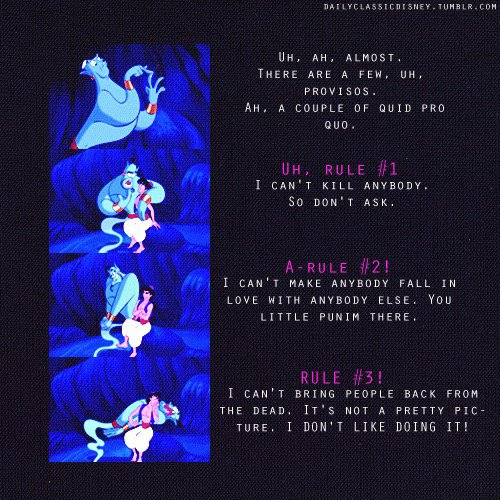
As with the Genie, it won’t do some things… For example, “How do I grow marijuana?” elicits the response, “I’m very sorry, but I can’t assist with that.”
What are others saying?
(We Are Teachers)
(Education Week)
(Cult of Pedagogy)
Can ChatGPT do better?
Out of curiosity, I asked ChatGPT to write an outline based on the original fourteen ideas it had generated and to write a blog post of 1,000 words.
If you want to see how it did, check it out here.
About the Author: Philip S. Tickle

Philip earned a Bachelor of Music in Music Education from James Madison University, a Master of Education in Curriculum and Instruction from the University of Richmond, and a Master of Science in Educational Leadership from Longwood University. These credentials reflect his dedication to continued professional development as he seeks to better serve his students and colleagues. Philip is an avid fan of technology, both in and out of the classroom.
Beyond the classroom, he enjoys the great outdoors, travel, and finds solace in the pages of a good book (usually British or European history). These interests inspire his teaching, adding depth to his students’ learning experiences.
As a guest author, Philip brings knowledge of productivity and AI from his own personal experience. Connect with Philip via email to stay connected.
 moving writers
1 Comment